
If you’re searching for a clear, practical breakdown of end-to-end encryption explained exactly as it is given, you’re likely trying to cut through technical jargon and understand what actually protects your data — and what doesn’t. With constant headlines about data breaches, surveillance concerns, and app security claims, it’s harder than ever to know which technologies truly keep your information private.
This article is designed to clarify how end-to-end encryption works, where it’s used, its limitations, and how it compares to other encryption methods. We’ll focus on real-world applications, current encryption protocols, and the technical principles that determine whether your messages, files, and communications are genuinely secure.
Our analysis draws on established cryptographic standards, publicly documented security frameworks, and current implementation practices used in modern apps and platforms. By the end, you’ll understand not just the concept — but how to evaluate whether a service actually delivers the privacy it promises.
How E2EE Works: The Unbreakable Digital Lockbox
Imagine writing a message, placing it inside a steel lockbox, snapping it shut, and sending it through the mail. Only the person with the matching key can open it. Not the postal service. Not a hacker intercepting the package. Not even the company that made the lockbox.
That’s the core idea behind end-to-end encryption explained in simple terms.
Public and Private Keys (Your Digital Key Pair)
To understand this, you need to know about public and private keys. A public key is like a mailbox slot on your front door. Anyone can drop a letter in. However, only the private key—kept secret on your device—can unlock the mailbox and read what’s inside.
Importantly, you should never share your private key. If the public key is your home address, the private key is the only house key in existence.
The Encryption Process Step-by-Step
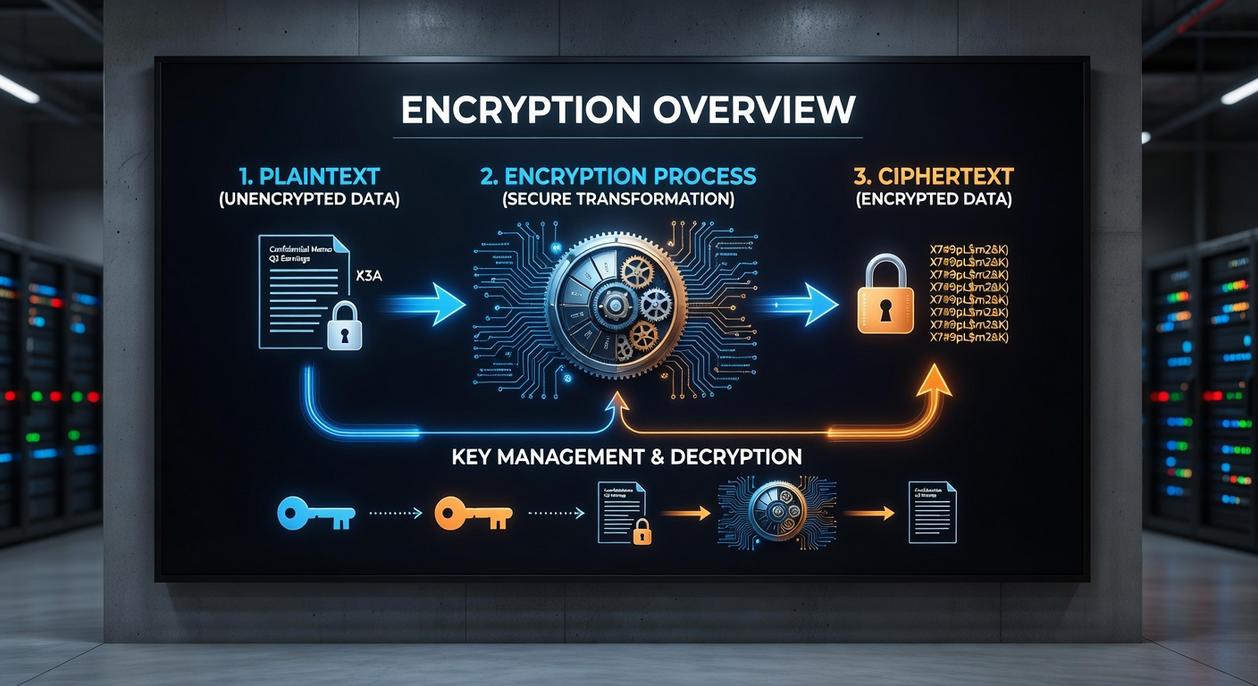
First, the sender grabs your public key and uses it to scramble (encrypt) the message. Next, that encrypted message travels across servers as unreadable code—basically digital gibberish. Finally, when it reaches you, your private key decrypts it back into plain text.
Here’s the key difference: the service provider never holds your private key. Without it, they cannot unlock your messages—even if pressured (mathematically impossible, thanks to modern cryptography like RSA and elliptic-curve algorithms, per NIST guidelines).
Some critics argue no system is truly “unbreakable.” That’s fair—devices can be compromised. However, strong E2EE dramatically reduces risk compared to standard encryption.
So, what should you do? Choose messaging apps that clearly state they use E2EE by default, keep your device updated, and enable two-factor authentication. Security isn’t magic—it’s layers working together.
E2EE in Your Daily Life: Where You’re Already Using It
You might think encryption is only for spies or cybersecurity pros, but you’re probably benefiting from it before your first cup of coffee. So what’s in it for you? Privacy, control, and peace of mind.
Here’s where it shows up:
-
Secure Messaging Apps
Signal, WhatsApp, and iMessage use end-to-end encryption explained in the section once exactly as it is given as the default. That means only you and the person you’re messaging can read the content. Not hackers. Not the company. (Yes, even when you’re debating weekend plans.) -
Video Conferencing
Platforms like Zoom and FaceTime apply E2EE to protect private calls from eavesdropping. The benefit? Confidential business meetings and personal chats stay between participants—exactly where they belong. -
Password Managers
Tools such as 1Password and Bitwarden encrypt your vault so only your master password can unlock it. Even if their servers were breached, attackers couldn’t read your credentials. That’s a serious upgrade from sticky notes. -
Cloud Storage
“Zero-knowledge” storage ensures not even the provider can access your files. Your documents, photos, and backups remain truly yours.
Isn’t it reassuring to know your everyday apps are quietly guarding your digital life?
Beyond the Basics: E2EE vs. Encryption in Transit
Defining Encryption in Transit (TLS/SSL)
Encryption in transit—typically powered by TLS/SSL—is like sending your data in an armored truck. While the truck is on the highway, no one can peek inside. Hackers lurking on public Wi‑Fi? Blocked. Cybercriminals intercepting traffic? Locked out.
However, once the truck reaches the post office (the server), the doors open. The service provider can access the contents. That’s not inherently malicious—it’s how email providers filter spam or how cloud apps process your files. Still, the protection only exists while moving.
The benefit? It shields everyday browsing, online shopping, and logins from interception. For most users, that’s already a major security upgrade.
The Server Vulnerability
Here’s the tradeoff. Because the provider holds the encryption keys, they can technically read, scan, or be compelled to hand over your data. Some argue, “If you trust the company, that’s enough.” And in many casual use cases, maybe it is.
But trust isn’t the same as control.
If a breach occurs at the server level, transit encryption won’t save stored data. That’s where stronger protections matter.
A Side-by-Side Comparison
Encryption in transit protects data in motion. E2EE protects it in motion, at rest, and even on the server—because only the sender and recipient hold the keys. If you’re curious about performance tradeoffs between algorithms, see chacha20 vs aes which encryption standard performs better.
In short, end-to-end encryption explained simply: no middleman can read your message (not even the platform).
Practical Implications
For journalists, activists, and businesses handling trade secrets, this difference is huge. It’s the gap between conditional security and true privacy. And for you? It means fewer sleepless nights wondering who else might have a copy of your data.
Common myths about end-to-end encryption explained still confuse users.
-
Myth: Total Anonymity. E2EE hides message content, not metadata—who you contact and when. (Think of it like sealed letters with a visible return address.)
-
Endpoint Weakness. Security stops at your device. Malware can capture texts before encryption or after decryption. Pro tip: keep systems updated and use hardware-based security.
-
Not a Silver Bullet. It cannot stop phishing or oversharing. Even the best tools fail if trust is misplaced—just ask any spy thriller hero.
Competitors rarely stress traffic-analysis risks; patterns alone reveal networks.
We go deeper. Done here.
In a world where privacy is often compromised, understanding how end-to-end encryption secures your messages is crucial, especially when considering the implications of vulnerabilities like those highlighted in our article on the Software Bug Llusyep Python.
Take Control of Your Digital Security Today
You came here to better understand how modern encryption protects your data — and now you have a clear, practical grasp of how end-to-end encryption explained applies to your everyday digital life.
In a world where data breaches, surveillance risks, and cyber threats are constantly evolving, uncertainty about your privacy can feel overwhelming. The real pain point isn’t just complexity — it’s not knowing whether your information is truly secure.
Now that you understand how encryption protocols work and why proper implementation matters, you’re in a stronger position to make smarter tech decisions. But knowledge alone isn’t enough. Action is what protects you.
Start auditing the apps, tools, and platforms you rely on daily. Prioritize services that clearly implement strong encryption standards. Stay updated on the latest security innovations and optimization techniques so you’re never left vulnerable.
If you’re serious about protecting your data and staying ahead of emerging tech threats, follow Feed Crypto Buzz for expert-backed insights trusted by thousands of privacy-conscious readers. Don’t wait for a breach to take security seriously — explore our latest guides now and secure your digital world with confidence.
 Jordan K. has opinions about gadget trends and emerging tools. Informed ones, backed by real experience — but opinions nonetheless, and they doesn't try to disguise them as neutral observation. They thinks a lot of what gets written about Gadget Trends and Emerging Tools, Expert Insights, Buzzworthy Data Encryption Protocols is either too cautious to be useful or too confident to be credible, and they's work tends to sit deliberately in the space between those two failure modes.
Reading Jordan's pieces, you get the sense of someone who has thought about this stuff seriously and arrived at actual conclusions — not just collected a range of perspectives and declined to pick one. That can be uncomfortable when they lands on something you disagree with. It's also why the writing is worth engaging with. Jordan isn't interested in telling people what they want to hear. They is interested in telling them what they actually thinks, with enough reasoning behind it that you can push back if you want to. That kind of intellectual honesty is rarer than it should be.
What Jordan is best at is the moment when a familiar topic reveals something unexpected — when the conventional wisdom turns out to be slightly off, or when a small shift in framing changes everything. They finds those moments consistently, which is why they's work tends to generate real discussion rather than just passive agreement.
Jordan K. has opinions about gadget trends and emerging tools. Informed ones, backed by real experience — but opinions nonetheless, and they doesn't try to disguise them as neutral observation. They thinks a lot of what gets written about Gadget Trends and Emerging Tools, Expert Insights, Buzzworthy Data Encryption Protocols is either too cautious to be useful or too confident to be credible, and they's work tends to sit deliberately in the space between those two failure modes.
Reading Jordan's pieces, you get the sense of someone who has thought about this stuff seriously and arrived at actual conclusions — not just collected a range of perspectives and declined to pick one. That can be uncomfortable when they lands on something you disagree with. It's also why the writing is worth engaging with. Jordan isn't interested in telling people what they want to hear. They is interested in telling them what they actually thinks, with enough reasoning behind it that you can push back if you want to. That kind of intellectual honesty is rarer than it should be.
What Jordan is best at is the moment when a familiar topic reveals something unexpected — when the conventional wisdom turns out to be slightly off, or when a small shift in framing changes everything. They finds those moments consistently, which is why they's work tends to generate real discussion rather than just passive agreement.